Saturday, April 8, 2023

Resolving the "No CORS Policy Found" Error in Sitecore 10.3 Identity Server


Encountering the Sitecore Identity Server error, specifically the "No CORS policy found for the specified request" issue, can be a frustrating experience for developers and administrators. In this blog post, we'll delve into the details of this error and provide a practical solution to address it.

Error Details:

The error message points to a problem with the CORS (Cross-Origin Resource Sharing) policy, specifically when the request origin is set to "null," indicating that it doesn't have permission to access the resource. The log entries show the execution of the relevant endpoint in the Identity Server, followed by an unhandled exception related to a SQL Server connection issue.

Error Log:

(Sitecore Identity/AA0001) Request origin "null" does not have permission to access the resource.

(Sitecore Identity/AA0001) No CORS policy found for the specified request.

(Sitecore Identity/AA0001) Executing endpoint '"Sitecore.Plugin.IdentityServer.Controllers.AccountController.Login (Sitecore.Plugin.IdentityServer)"'

[INF] (Sitecore Identity/AA0001) Route matched with "{action = \"Login\", controller = \"Account\"}". Executing controller action...

[INF] (Sitecore Identity/AA0001) Executed action "Sitecore.Plugin.IdentityServer.Controllers.AccountController.Login (Sitecore.Plugin.IdentityServer)" in 16964.3894ms

[ERR] (Sitecore Identity/AA0001) An unhandled exception has occurred while executing the request.

System.Data.SqlClient.SqlException (0x80131904): A network-related or instance-specific error occurred while establishing a connection to SQL Server...

 ---> System.ComponentModel.Win32Exception (2): The system cannot find the file specified.

Solution:

To address this issue, follow these steps:

Investigate the CORS Policy:

Check your Sitecore configuration and ensure that the CORS policy is correctly configured to allow the specified request origin. Review Sitecore documentation and relevant articles to verify the proper CORS setup.

Review External Resources:

The provided Sitecore Stack Exchange link (https://sitecore.stackexchange.com/questions/19242/what-does-this-error-message-in-the-identity-server-logs-mean) can offer valuable insights into similar issues. Explore discussions and solutions from the community.

Check SQL Server Services:

In the presented solution, the root cause was identified as SQL Server services not running. Validate the status of your SQL Server services and restart them if necessary. Ensure that SQL Server is configured to allow remote connections and that the instance name is correct.

Conclusion:

Resolving the "No CORS policy found for the specified request" issue in Sitecore Identity Server involves a comprehensive approach. By investigating the CORS policy, reviewing external resources, and addressing potential SQL Server service issues, you can successfully mitigate this error. Remember to adapt these steps based on your specific environment and configurations.


Monday, March 6, 2023

Overcoming Sitecore CLI Plugin Installation Hurdles: Resolving "dotnet-tools.json came from another computer and might be blocked" Error in Sitecore JSS


When installing Sitecore CLI Plugins, you may receive the following error:


File .config\dotnet-tools.json came from another computer and might be blocked to help protect this computer. For more information, including how to unblock, see https://aka.ms/motw

This error occurs when the .NET tool installer detects that the dotnet-tools.json file is from a different computer. This is a security feature to help protect your computer from malicious code.

Solution

To fix this error, you can take the following steps:

Back up the dotnet-tools.json file.

Recreate the dotnet-tools.json file.

Update the content of the dotnet-tools.json file to include the Sitecore CLI Plugins that you want to install.

Run the following command to install the Sitecore CLI Plugins:

dotnet tool install sitecore.cli

Example


# Back up the `dotnet-tools.json` file

copy dotnet-tools.json dotnet-tools.json.backup


# Recreate the `dotnet-tools.json` file

new-item -itemtype file -path dotnet-tools.json


# Update the content of the `dotnet-tools.json` file

$tools = @{

    {

        "name": "Sitecore.CLI",

        "version": "5.1.25"

    }

}


Out-File -FilePath dotnet-tools.json -InputObject $tools -Encoding ascii

# Install the Sitecore CLI Plugins

Conclusion

Once you have followed these steps, you should be able to install the Sitecore CLI Plugins without any errors.

Sunday, February 5, 2023

How I fixed my Sitecore CM instance when it wouldn't come up (Invoke-RestMethod "http://localhost:8079/api/http/routers0


My Sitecore CM instance wasn't coming up, and I was getting the following error:

Write-Error: Timeout waiting for Sitecore CM to become available via Traefik proxy. Check CM container logs

I checked the Docker logs and found that the issue was with the license file path. The license file was located on a different drive than the one that Sitecore was expecting.

To fix the issue, I did the following:

Deleted all the Docker containers.
Initialized the Sitecore instance again.
Set the license file path using the following command:
setx HOST_LICENSE_FOLDER D:\\license
Ran the up script to start the Docker containers.
After following these steps, the Sitecore CM instance came up and I was able to log in.

If you're having trouble getting your Sitecore CM instance to come up, be sure to check the license file path and make sure it's set correctly.


Sunday, January 15, 2023

Troubleshooting Sitecore JSS: Resolving the "Provided SSC API Key is Not Valid" Error


Recently, while doing another setup, I got this error 


Solution - First try to hit this URL 

It's related with the Jss API, make sure that you have created a new API key here 


Try to this this URL to confirm if the GraphQL service is running

https://sitecore103sc.dev.local/api/graph/items/master/ui?sc_apikey={AC48C51E-DDFF-48E5-BA2A-1884CE9CCBF2}

When I hit this URL, I got below error 


Follow this document to setup the GraphQL - https://doc.sitecore.com/xp/en/developers/hd/21/sitecore-headless-development/start-using-sitecore-graphql-api.html

Here are the steps


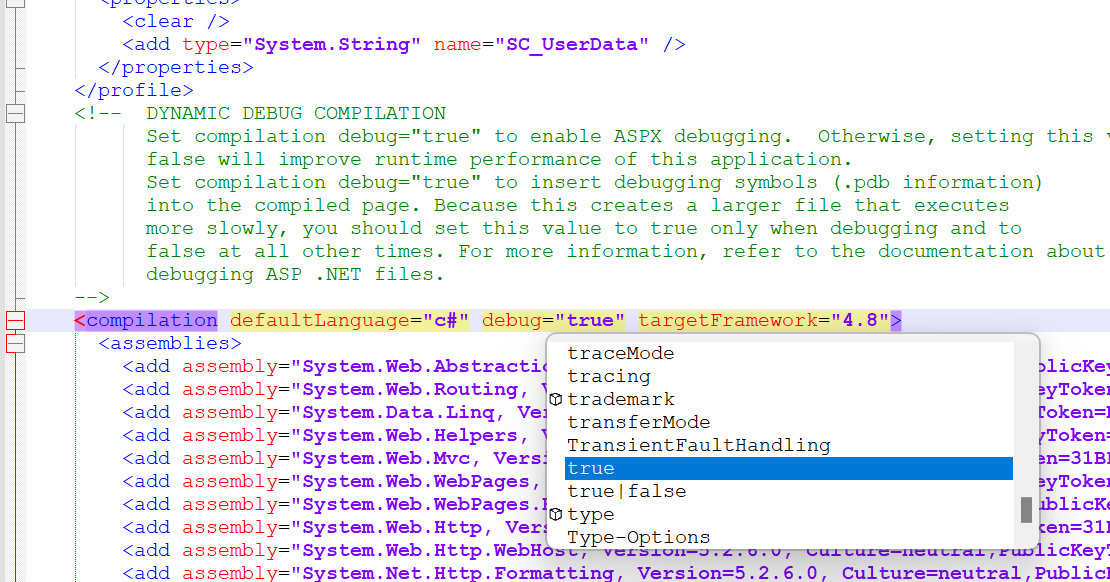
1. Update this configuration to true 

<compilation debug="true">.


Enable the master GraphQL file 


After this change, I got a different error while browing GraphQL service

Now, at this stage, try to hit the GraphQL UI

https://sitecore103sc.dev.local/sitecore/api/graph/items/master/ui

I go this error 
{"errors":[{"message":"Authentication required."}]}


Make below change to Sitecore.Services.GraphQL.config

Finally to make it work, you have to make the below change  (This was the main change in my scenario)

Go to 
C:\inetpub\wwwroot\Sitecore103sc.dev.local\App_Config\Sitecore\Owin.Authentication\Sitecore.Owin.Authentication.config

add this line 
<path>/sitecore/api/graph/items</path> under       </siteNeutralPaths>


After that change, I can browser the GraphQL through the UI

Please note, it's recommned that you should not enable these GraphQL end point on prodution for the security purpose, all these changes I'm doing is just for the local setup.

but still, I got the authentication error , I'm running below query


query {
  # path can be an item tree path or GUID-based id
  item(path: "/sitecore/content/Experience-Edge/home", language: "en") {
    # items can be cast to a Template type with inline fragments
    ... on AppRoute {
      pageTitle {
        value
      }
    }
    # fields can be cast to a Field type with inline fragments
    field(name: "pageTitle") {
      ... on TextField {
        value
      }
    }
  }
}


I made the below changes to the API key, related to the CORS but it didn't help 


After this change, I start the  JSS application but got the below error 


rror: GraphQL.ExecutionError: Error trying to resolve layout. ---> System.ArgumentNullException: Value cannot be null. Parameter name: root at Sitecore.Diagnostics.Assert.ArgumentNotNull(Object argument, String argumentName) at Sitecore.Data.ItemResolvers.ItemPathResolver.ResolveItem(String path, Item root) at Sitecore.Services.GraphQL.EdgeSchema.Queries.LayoutQuery.Resolve(ResolveFieldContext context) at Sitecore.Services.GraphQL.Schemas.RootFieldType`2.Intercept(ResolveFieldContext context) at GraphQL.Resolvers.FuncFieldResolver`1.GraphQL.Resolvers.IFieldResolver.Resolve(ResolveFieldContext context) at GraphQL.Execution.ExecutionStrategy.<ExecuteNodeAsync>d__7.MoveNext() --- End of inner exception stack trace ---: {"response":{"data":{"layout":null},"errors":[{"message":"GraphQL.ExecutionError: Error trying to resolve layout. ---> System.ArgumentNullException: Value cannot be null.\r\nParameter name: root\r\n at Sitecore.Diagnostics.Assert.ArgumentNotNull(Object argument, String argumentName)\r\n at Sitecore.Data.ItemResolvers.ItemPathResolver.ResolveItem(String path, Item root)\r\n at Sitecore.Services.GraphQL.EdgeSchema.Queries.LayoutQuery.Resolve(ResolveFieldContext context)\r\n at Sitecore.Services.GraphQL.Schemas.RootFieldType`2.Intercept(ResolveFieldContext context)\r\n at GraphQL.Resolvers.FuncFieldResolver`1.GraphQL.Resolvers.IFieldResolver.Resolve(ResolveFieldContext context)\r\n at GraphQL.Execution.ExecutionStrategy.<ExecuteNodeAsync>d__7.MoveNext()\r\n --- End of inner exception stack trace ---","locations":[{"line":2,"column":7}],"path":["layout"],"extensions":{"code":"ARGUMENT_NULL"}}],"status":200,"headers":{}},"request":{"query":"query {\n layout(site:\"sitecore-jss-app\", routePath:\"/\", language:\"en\"){\n item {\n rendered\n }\n }\n }"}}

\


After this change, I restated my system and it started working

Monday, January 9, 2023

Resolving "curl: (6) Could not resolve host: nodejs.org" Error in Dockerized Headless Setup


Encountering errors during the configuration of a headless setup using Docker can be a stumbling block for developers. In this blog post, we'll address a specific issue where the error "curl: (6) Could not resolve host: nodejs.org" surfaced and explore a straightforward solution to overcome this hurdle.

Error Details:

The error manifested while attempting to run a headless setup with Docker. Despite successfully accessing the Dockerfile at \docker\build\nodejs\Dockerfile through a web browser, the persistent issue persisted, causing frustration and hindering progress.


Error Log:

curl: (6) Could not resolve host: nodejs.org

Solution:

To resolve this issue, follow these steps:

Inspect Dockerfile Path:

Confirm that the path to the Dockerfile (\docker\build\nodejs\Dockerfile) is correct and accessible. Ensure there are no typos or misconfigurations in the file path.

Check Docker Compose Settings:

Validate your Docker Compose settings. Specifically, ensure that the Docker Compose V2 option is not checked. Additionally, make sure that the "Use the WSL 2 based engine" option is checked in Docker Desktop.

Conclusion:

Addressing the "curl: (6) Could not resolve host: nodejs.org" error involves a careful examination of Docker Compose settings. By ensuring that Docker Compose V2 is unchecked and the WSL 2 based engine is selected in Docker Desktop, you can mitigate this issue and proceed with your headless setup seamlessly.

Note: This solution is based on the specific environment and conditions encountered. It is recommended to adapt these steps as needed, considering the unique aspects of your development setup.


Monday, November 28, 2022

Sitecore personalise and CDP custom implementation to capture additional data

Sharing my learning and implementation for the Sitecore CDP

Recently, I got work to implement the Sitecore CDP to capture the Quiz Question and Answers and when the user subscribe to the site, I need to capture the data, here is a live site.


Sending Q&A data in the below format
{
   "channel":"WEB",
   "type":"VIEW",
   "currency":"AUD",
   "language":"EN",
   "page":"Report",
   "pos":"betheboss",
   "session_data":{
      "answers":[
         {
            "id":"1",
            "value":62,
            "level":1.24,
            "updated":true
         },
         {
            "id":"2",
            "value":50,
            "level":0.41,
            "updated":true
         },
         {
            "id":"3",
            "value":50,
            "level":2.67,
            "updated":true
         },
         {
            "id":"4",
            "value":50,
            "level":2.37,
            "updated":true
         },
         {
            "id":"5",
            "value":50,
            "level":2.77,
            "updated":true
         },
         {
            "id":"6",
            "value":50,
            "level":0,
            "updated":true
         }
      ]
   },
   "browser_id":"fa46222c-aeb4-48c5-89c3-8631df2c4237"
}

and it got capture in the CDP - it can be found in the debug tab, search for the newly created contact.


Here are the list of all the events


Here is the detals of the capture data

Impleementation details - I used axios utility to interact with the Sitecore CDP apis

Here is the sample code
/* eslint-disable no-return-assign */
import axios from "axios";

export function GetBrowserId() {
	if (window?.Boxever && window?.Boxever?.getID()) {
		const result = window?.Boxever?.getID();

		return result;
	}
}

export function PushIdentifyEvent({ event, onSuccess }) {
	const browserID = GetBrowserId();

	event.browser_id = browserID;

	const message = JSON.stringify(event);

	const clientKey = process.env.REACT_APP_CLIENT_KEY;

	const boxeverAPIEndpoint = `https://api-ap-southeast-2-production.boxever.com/v1.2/event/create.json?client_key=${clientKey}&message=${message}`;

	axios
		.get(boxeverAPIEndpoint)
		.then(function (response) {
			onSuccess(true);
		})
		.catch(function (error) {
			// handle error
		});
}

On Success, Used below code to send the message
export default function CardSuccess() {
    const totals = useSelector((state: RootState) => state.totals);
    const [formData, setFormData] = useState({ email: "" });
    const [success, setSuccess] = useState(false);
    const onChange = (e: React.ChangeEvent<HTMLInputElement>): void =>
        setFormData({ ...formData, [e.target.name]: e.target.value });
    const { email } = formData;
    const handleSubmit = (e: React.SyntheticEvent) => {
        e.preventDefault();
        const event = {
            channel: "WEB",
            type: "IDENTITY",
            currency: "AUD",
            language: "EN",
            pos: "betheboss",
            email,
            identifiers: [
                {
                    provider: "email",
                    id: email,
                },
            ],
        };

        PushIdentifyEvent({ event, onSuccess: (val: boolean) => setSuccess(val) });
    };

Also used useEffect

useEffect(() => {
        if (success) {
            setFormData({
                email: "",
            });
        }
    }, [success]);

Tuesday, February 8, 2022

Most common again - Sitecore 10.2 when running on a diff machine MSBuild: Could not locate executable.

 I got the solution from a VM and started running on my local machine and got the below error, it's the most common error and to fix it basically we need to set the correct path into the build-config file

  "MSBuildPath": "C:\\Program Files\\Microsoft Visual Studio\\2022\\Community\\MSBuild\\Current\\Bin\\msbuild.exe",

Diff system has diff VS version installed so make sure that the script has the correct path from your installed VS version