Friday, September 8, 2017

Practical Session 11- Sitecore- TDS best practices and design your own TT files for the desired ORM


TDS is very useful for the rapid Sitecore developers, this is basically a tool which helps to generate the ORM for a template which takes cares generating the interface, Constants and partial classes.
There are a lot of other features, will try to cover key features here.
WHAT’S IN THIS Session?
  1. Rearchitect Header and Item tt file to design your own ORM output.
  2. Setup TDS for Sitecore Project.
  3. Sync-Up TDS with Sitecore Project.
  4. TDS Installation and best practices.
  5. Difference between Serialized and TDS packages.
  6. Best practices for the multiple sites.
If you are using TDS, You do not need to use the GlasssMapper, Secondly it has a lot of other capabilities like - deploy your Sitecore packages, You can automate these package, even you can deploy file system - include/exclude dll etc.
Here, I will explain all these steps from download TDS to generate the ORM, design your own TT files.
TT files are basically used as a schema to generate the ORM- With a little understanding of the structure you can modify this file to modify the desired ORM files
  1. First, cover the basic to setup the TDS then will move the advance
Download TDS package:- https://www.teamdevelopmentforsitecore.com/Download
Install TDS - It's very simple step.
Integration TDS within your project.
For a single side, We can plan to create multiple TDS projects, like one for the Core, second for the Master and third for the actual Template where ORM needs to be generated. We are creating altogether a new project for Template, As TDS does not support generate ORM based on selected items.
For more details, Please follow my blog here-

Solr- MatchAllDocsQuery Utility

MatchAllQuery is a utility class which matches all documents. Each match is assigned a score of 0.0, so that in #composite queries, any document which matches against another part of the query will be #ranked higher than a document which matches only via the MatchAllQuery. For instance, below query can be used.
   Lucene.Net.Search.MatchAllDocsQuery matchAllQuery = new Lucene.Net.Search.MatchAllDocsQuery();
   hits = context.Searcher.Search(matchAllQuery));
I had a requirement where it's required to implement the result from the best possible result from full context.
We had created an index and in case of data not found wanted to get data from different templates.
Here “_path” field contains full item’s path where items’ name replaced with their ID
Executing the above query will return your items under the SitecoreTemplateName.TemplateABC item in the result(if you have indexed that section):
In case if result not found or wanted to show from different template - We should use the
Lucene.Net.Search.MatchAllDocsQuery class and create the appropriate query.
For more details:- 

Sitecore- Inside Event Queue and Publish Queue(Master, Web, and Core).

Version: Sitecore.NET 8.2 (rev. 170407)
Here are some interesting information/working sessions about Sitecore #EventQuoueand #Publishing Queue, in case of #workflow, assigned and in case of #Normal and #schedule publishing.
EventQuoue- Just to update here about the EventQuoue - These Queue Sitecore use to maintain the communication between different- different databases - It captures the event and change/audit details, Core database capture event mostly related to Security and publishing(Rebuild indexes)
Before Sitecore 8.1, It only allows to clean up event older then 1 day, but that may create a problem when publishing is too much, especially if publish if very frequent. They have introduced IntervaleToKeep and that will help to determine ours to keep it alive.


  04:00:00
  1
Publishing Queue - This will be used mostly on Master and Web, a First time when the user does any change in the item, it stores details in publishing queue and event Queue and then will move to Web based on the publish type.

This is very useful in case of incremental publishing - As it only trigger and Async Sitecore changes, In case of Schedule publishing mostly this incremental publishing is being used, As most of the time it's required to enable future publishing for the whole site and comparing each change and publishing in a defined interval would be a performance issue, and secondly through incremental publishing the root can't be defined so this Queue will be helpful.
Sitecore keeps 30 days of publishing queue. We can change these configuration by


  10
#Important:- What if the content has been scheduled for publishing after 11days and publishing cleanup is setup for 10 days, that may create an issue so it should be communicated to the user that scheduled publishing maximum allow time will work based on this setting DayToKeep.
Sitecore has three key databases - Master, Web, and Core
Each database has these two tables. Will first clear these three tables and then run some scenarios and analyzed the data, isn't too exciting. Yes it's
Let's run this query - Please change your database name based on your local instance.
use localdevSitecore_Master
Delete from dbo.PublishQueue 
Delete from dbo.EventQueue
use localdevSitecore_Web
Delete from dbo.PublishQueue 
Delete from dbo.EventQueue
use localdevSitecore_Core
Delete from dbo.PublishQueue 
Delete from dbo.EventQueue
----------------------------------
use localdevSitecore_Master
select * from dbo.PublishQueue order by 1 desc
Select distinct *  from dbo.EventQueue
use localdevSitecore_Web
select * from dbo.PublishQueue order by 1 desc
Select distinct *  from dbo.EventQueue
use localdevSitecore_Core
select * from dbo.PublishQueue order by 1 desc
Select distinct *  from dbo.EventQueue
Make sure the result is blank for all these tables, PFB sample
Create the First item in Sitecore. - I got Item ID - {7F0D3720-9CC9-4D6C-9E80-0ABB8860C94B}
Master - dbo.PublishQueue - 3 Records - with actions below details.
Created, Saved and Version Added
Web- dbo.PublishQueue - 3 Records - with actions below details.
No Records
Core- dbo.PublishQueue - 0 Records but dbo.EventQueue got almost 21 records. Almost all are related to reference to index updations.
Point#1 - Master DB will have a reference for Item but Core DB will only have a reference for the Indexes ( Later on will discuss these indexes in context of multiple CD servers).
Point#2 - PublishingQueue will have high-level details and action like the item - added, saved etc.
EventQueue will have full details about field level change
Question#1 - There are four entries in Event Ques two are the almost same only difference in item name - Anyone knows why or any specific purpose?
Let's now publish this item -
I published this item in one language, here (out of the context) I got below message - One item created and one skipped
Question 2 - Why I got the message of one item skipped here? Many be will discuss this - let's continue here with the main topic.
As per my understanding, As we choose the smart publishing so only required changes moved from Master to the web or second we have only choose English - Not sure - Will review this in next session.
Result-
Master - dbo.PublishQueue - NO change.
#Question - What is DAC_Index?
#Question - What is Recovery ID - We noticed in instancdedatafield in CoreDatabase EventQueue

"EventName":"publish:startPublishing","Options":[{"CompareRevisions":true,"Deep":false,"FromDate":"\/Date(1504386516076)\/","LanguageName":"en","Mode":3,"PublishDate":"\/Date(1504391279790)\/","PublishRelatedItems":false,"PublishingTargets":["{8E080626-DDC3-4EF4-A1D1-F0BE4A200254}"],"RecoveryId":"0f06ba19-a91c-4b08-a7bf-54ebcb27572e","RepublishAll":false,"RootItemId":"7f0d3720-9cc9-4d6c-9e80-

Master - dbo.EventQueue- NO change.
Web- MasterPublishQueue - No change
Web- EventQueue - Got three records
First entry just for the publishing details, second for the item while field level details, third is high-level details of the events.
Core- PublishQueue- No change
Core- EventQueue - the last record was 21, not its 46 , Almost 21 new records are related to update the index but rest 4(46-(21+21)) are related to actual item event capture.
Let's review this four items.
First three are related to the user and the last one is related to job running status and owner is an Anonymous user.
{"EventName":"publish:statusUpdated","Status":{"CurrentLanguageName":"English","CurrentTargetName":"web","Expired":true,"Failed":false,"IsDone":true,"Messages":["Job started: Publish to 'web'","Items created: 1","Items deleted: 0","Items updated: 0","Items skipped: 1","Job ended: Publish to 'web' (units processed: 2)"],"Processed":2,"State":3},"StatusHandle":{"instanceName":"localdev","m_handle":"d0b296a2-a2ba-45d6-8d94-fa45c2452e85"}} localdev 1 1 default\Anonymous
What about in case of Schedule publishing -
Let's review this - First quickly enable the scheduled publishing, Add below configure in include folder, make sure it should have naming convention of z


        master
        web
        incremental
        en, ar


Now again flush all the content and quickly verify these transactions.
Let's observe the behavior of schedule publishing agent without any activities.
Notice - This agent will keep entering data in Code and Web EventQueu, As we have setup interval for 2 minutes and two languages it's entering 2 records in every two minutes.
I published this item.
Each item in event queue there is a field call Mode- which can be used to identify by what method this item get entered like smart, full or incremental(by Agent).
#Important - Sometimes we faced some issue where we identified record modified through custom utility or scheduling agent - this mode will be helpful If this is because of incremental publishing the most reason would be Schedule publishing agent.
Some useful References:-https://sdn.sitecore.net/upload/sitecore6/63/introducing_sitecore_cms_6.3_a4.pdf

Saturday, September 2, 2017

Sitecore Control Panel Feature 1- Best Practices to Manage Role and Users - Part1

Sitecore Access Management has a lot of capabilities, We have used some good features to manage access based on the workflow(grade based) and IA consideration for multisite and multilingual.

This looks like a very basic session but this will cover a lot of fundamental basic setup and amazing scenarios.

Understanding Role Management.


A role is a group of access that can be combined and applied to a user, there is a lot of benefit of using the rules but some of them are below.

Content Highlights-

1. Access control for the multilingual users.
2. How many default languages for the client Sitecore supports?


3.  Can I hide content for some languages to the user – You can remove all access but still you will see the language version but would not be able to modify?

4.  All tree node in multilingual and fall back into default languages.
5.  What all are default role and users in the Sitecore bundles.
6.  Can I complete hide node for certain users?
7.  Access control for the workflow to handle user activities like some user can’t approve the content, it has to be reviewed by other users.
8.  Can user login without any Role?
9   Can you provide access based on templates?
10  There is more option where we can setup role based on workflow stags – like what all are users which have access to approve /reject etc.
11.  Profile setup all settings.
12  .If I have one item in root node but don’t want to allow CRUD operation to the parent node, is this doable?

Let’s talk about some basic feature of Role.

1. Any number of the user which got assigned the same role can be changed/managed easily.
2. It will help to manage user and setup quickly etc.
3. It can be assigned at workflow level for differentiating user roles like approver and publisher, can be setup at the parent node, basically, these are an example of access control which is part of the role and individual users access.

This option allows the grouping of users into structured units, such as Grade1, sales, anonymous users, and so on. This makes it easier to organize security access because you can use a single role to assign security access rights to multiple users. Roles give you the flexibility to change permissions and to add or remove users without having to make changes to the whole website

All role information is available here: - 

Let’s do some practical and amazing scenarios.

1. Create a first role and domain configuration.

Login to the Sitecore


Go to the Role Manager

#There will be default 35 Roles in the system.


Click on new – top section


Let’s give it a name - Grade1AllAccess

Search the items here for the next assignation


Select the role and start using the above options.
All existing roles are in a #Sitecore domain if required to create new domain make sure appropriate roles has to be created/associated with the new domain

Let’s try a POC – Create a new user and assign this role without any permission to understand the default role and access.
Go to dashboard and select the User Manager


There are total #four default users in the Sitecore
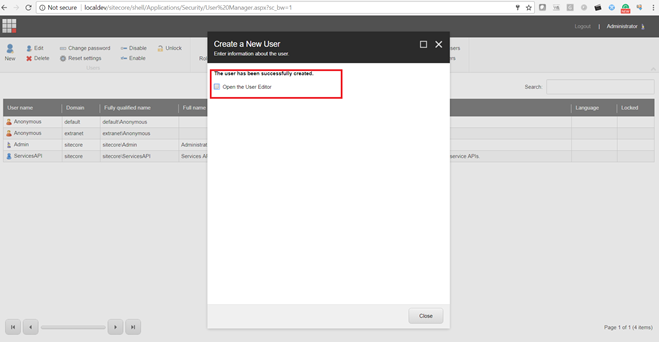
Click on New Button to add a new user and enter  the below information


Add a role from the role edit section – Select the newly created role from here.


Click Next and it will ask to open the editor option.

Next window to assign the access at the item level and more details.

This user can be #assigned as an Admin user in this context he will get access to the whole site including layout, system, and templates.


Now login from this user-

#Not able to log in? . #Although provided the default role?


Providing Author access  - This Author role is a group of some predefined role associated/grouped with this role If you assign an Author role default role will be assigned automatically (from default 35 roles)

Log in again to UserManger and double click to the user then go to the member of options.


Provide here Author access.

If you provide the Author access, then the user will be able to log in here.

Default login screen for the Author - #Bydefault author will have access to all content in read only mode.


If we try to access the editor part

Content will have read only access to the Author, Can't modify any content.


Let's check access for the author.


Author has default read only access for all items but not sure why it also has access to Media library.

#You can share if have any idea about this?

You can add more access at the field level - from the column settings.

Click on the column


Here we can apply below settings for the item.

Coloum level access details
  1. Field Read
  2. Field Write
  3. Read
  4. Write
  5. Rename
  6. Create
  7. Delete
  8. Administer
  9. Language Read
  10. Language Write
  11. Site Enter
  12. Show in Insert
  13. Workflow State Delete
  14. Workflow State Write
  15. Workflow Command Execute
  16. Customize Profile Key Values
  17. Create Bucket
  18. Revert Bucket
  19. *
  20. Field Remote Read
Thease are really integresting fields.


Difference beetwein Member and MemberOf in User Role.

Member means this role is under any member or not? - If let's say we have two role Author and developer.

Developer will have multiple role, As example below.


Here we can see Author is part of Developer role hence Author will come in member of Developer list.

Example below.


Go to - Author
Member of means what all are groupd role withing this role, For the same Author go to Member section.


Let's run some basic scenarion to and to cover role access for multisite.

For the test purpose, we have create below tempaltes.


Sample content to verify the access


Let’s say login from the default editor logging

Default should have access to all content in read only mode.


Hide particular node for the Grade1User1, Steps-
Login to role manager and assign the particular role at parent node.


Result – Parent node can complete hided from the system by read only access.


What if I remove the parent node read only access and allow all child to read and write access, will all children will be visible – NO


Results:-


Questions and answer- Initial draft.

1.      How many default roles in the Sitecore?
Answer- 35
2.      What is different in Member, Member Of and Domain off?
3.      Each role will be associated with Member OFF- Yes/No?
Answer- Yes
4.      What will happen if I create a new role let’s say A and a new user let’s say User1 and assign this role A – without any more access, will he be able to login.
Answer – Required author or any member of permission.
5.      Default Author role will be able to see all content in read only mode or can edit or delete.
Answer – Read only mode
6.      Can you provide access based on templates?
7.      Can you provide access at root/parent level node?
Answer – Yes
8.      Can we hide complete tree node?
Answer – Yes
9.      If I have one item in root node but don’t want to allow CRUD operation to parent node, is this doable?
Answer- Yes