Friday, March 6, 2020

Catalog Item of the Storefront catalog Configuration cannot be found.

 Recently, I found this issue on Vanilla Sitecore XC setup, After an investigation, I came to know it's because of missing catalogue setting under the storefront.


 to fix that, I have selected the right catalog and it resolved the issue.


Saturday, February 22, 2020

SXA - High-level tree structure and steps for the theme extension.

SXA has a highly flexible structure, and it follows the Sitecore Helix principles that contain the best development process and structure for the building, testing, extending, and maintaining the implementations.

Before going further, I would like to mention the basic structure of SXA and what is required and recommendation to extend the theme.

Here is the high-level view for the SXA tree structure including content, media library and templates.


Steps to extend the SXA theme.

We can extend the theme by creating a theme extension and using the Attach Theme Extension or the Extend Site Theme action.

Extnstion theme allows us to extend the base theme without any modification to the base theme. And this can be attached to an existing site to override the part of the theme/design.

Steps - go to this path /Sitecore/media-library/Extension Themes and create a new theme.


New extended them structure will be like this -


Upload a file for fonts, images, scripts or styles.


We must use the extend site theme action to extend the existing/ or new site theme, and it will be added automatically.

There are two ways to attach the extended them to the site.

One is to create a separate module and install it. You can find more details here - Extend by a separate module, the second option is to navigate to System\Settings\Feature\Experience Accelerator and add an item extend site theme, 


To deploy them separately, we must use Attach Theme Extension action.

Create a new Attach Theme Extension and select below two values, the first field name is 'Theme that is extended' and the second one is  'Extension Themes'.

Save and refresh the experience editor. Extension theme will be applied.


Thursday, February 6, 2020

Fix for Unable to start Kestrel. 5000 access permission sitecore

Stop the authoring - it's pointing to the same port - that has resolved the issue.

Example - https://localhost:5000/api/$metadata&#8221


Tuesday, January 14, 2020

Sitecore XC error Commerce.Connector - Release mapping lock

 Recently, We have updated the configuration of commerce authoring and got very strange errors as below

 1508 12:44:10 ERROR Commerce.Connector - Request URL: GetCatalogMappings(environmentName='') - Exception: System.AggregateException: One or more errors occurred. ---> System.Threading.Tasks.TaskCanceledException: A task was canceled.  
   --- End of inner exception stack trace ---  
   at System.Threading.Tasks.Task`1.GetResultCore(Boolean waitCompletionNotification)  
   at Sitecore.Commerce.Engine.Connect.DataProvider.CommerceRepository.InvokeHttpClientGet(String serviceCallUrl, Boolean useCommerceOps, Boolean raiseException, String language, String environment, IDictionary`2 headers)  
 ---> (Inner Exception #0) System.Threading.Tasks.TaskCanceledException: A task was canceled.<---  
 Exception: System.AggregateException  
 Message: One or more errors occurred.  
 Source: mscorlib  
   at System.Threading.Tasks.Task`1.GetResultCore(Boolean waitCompletionNotification)  
   at Sitecore.Commerce.Engine.Connect.DataProvider.CommerceRepository.InvokeHttpClientGet(String serviceCallUrl, Boolean useCommerceOps, Boolean raiseException, String language, String environment, IDictionary`2 headers)  
 Nested Exception  
 Exception: System.Threading.Tasks.TaskCanceledException  
 Message: A task was canceled.  
 1508 12:44:10 INFO Commerce.Connector - Release mapping lock  
 1508 12:44:10 INFO Commerce.Connector - Acquiring mapping lock  
 1508 12:44:10 INFO Commerce.Connector - Mapping locked  
 1508 12:47:40 ERROR Commerce.Connector - Request URL: GetCatalogMappings(environmentName='') - Exception: System.AggregateException: One or more errors occurred. ---> System.Threading.Tasks.TaskCanceledException: A task was canceled.  
   --- End of inner exception stack trace ---  
   at System.Threading.Tasks.Task`1.GetResultCore(Boolean waitCompletionNotification)  
   at Sitecore.Commerce.Engine.Connect.DataProvider.CommerceRepository.InvokeHttpClientGet(String serviceCallUrl, Boolean useCommerceOps, Boolean raiseException, String language, String environment, IDictionary`2 headers)  
 ---> (Inner Exception #0) System.Threading.Tasks.TaskCanceledException: A task was canceled.<---  
 Exception: System.AggregateException  
 Message: One or more errors occurred.  
 Source: mscorlib  
   at System.Threading.Tasks.Task`1.GetResultCore(Boolean waitCompletionNotification)  
   at Sitecore.Commerce.Engine.Connect.DataProvider.CommerceRepository.InvokeHttpClientGet(String serviceCallUrl, Boolean useCommerceOps, Boolean raiseException, String language, String environment, IDictionary`2 headers)  
 Nested Exception  
 Exception: System.Threading.Tasks.TaskCanceledException  
 Message: A task was canceled.  
We didn't find the root caue but a full redployment and restart of the IIS had resovled that issue

Friday, January 3, 2020

Sitecore Experience Commerce (How to add associated entity in case of No result found)

For adding a related product list, We need to associate product entity with the existing product, I was trying to add a product but couldn't find that product in the search result.


in this case, make sure to search the product by full entity name like  Entity-SellableItem-DN151254


even, in that case, you wouldn't see the result but just press the enter or yes button, You will see that the product has been associated with the current product.

that's how we search and associate entity.

Saturday, November 16, 2019

Solr - Basic algorithm for TFIDF, LTR and common functions.

It's really very interesting to understand how Solr by default is giving you a result in a particular order.


Let's say if you search for a keyword BbQ ( B - Capital Letter, b -Small Letter and Q as capital letter), How you are getting the result and why you are getting a few result on top and what all are options available to change the order of the results.

So if you are queries to understand the whole flow, THIS BLOG IS FOR YOU :) 


First,We should understand the Solr query flow.


Here is a high-level view of existing Solr Algorithm, mainly it uses term frequency and inverse document frequency as a based and BM25 as base.


Solr by default use Lucene as a core and the default ranking model is known as tf.idf model.


First, Let's understand what is this model in general.


 tf–idf or TFIDF, short for term frequency–inverse document frequency, is a numerical statistic that is intended to reflect how important a word is to a document in a collection

 or corpus. It is often used as a weighting factor in searches of information retrieval, text mining, and user modeling. The tf–idf value increases proportionally to the number of times
 a word appears in the document and is offset by the number of documents in the corpus that contain the word, which helps to adjust for the fact that some words appear more frequently 
in general. tf–idf is one of the most popular term-weighting schemes today; 83% of text-based recommender systems in digital libraries use tf–idf.

Term FrequencyThe weight of a term that occurs in a document is simply proportional to the term frequency.


Inverse Document Frequency - The specificity of a term can be quantified as an inverse function of the number of documents in which it occurs.


Here is a list of all Solr available functions -


Few useful functions are  - 


  1. docfreq(field,term) returns the number of documents that contain the term in the field.
  2. termfreq(field,term) returns the number of times the term appears in the field for that document.
  3. idf(field,term) returns the inverse document frequency for the given term, using the Similarity for the field.
  4. tf(field,term) returns the term frequency factor for the given term, using the Similarity for the field.
  5. norm(field) returns the “norm” stored in the index, the product of the index time boost and then length normalization factor.
  6. maxdoc() returns the number of documents in the index, including those that are marked as deleted but have not yet been purged.
  7. numdocs() returns the number of documents in the index, not including those that are marked as deleted but have not yet been purged.


For more reference - 


  1. https://lucene.apache.org/solr/guide/7_7/function-queries.html
  2. https://lucidworks.com/post/solr-relevancy-function-queries/


Ranking of query results is one of the fundamental problems in information retrieval (IR), the scientific/engineering discipline behind search engines. Given a query q and a collection D of documents that match the query, the problem is to rank, that is, sort, the documents in D according to some criterion so that the "best" results appear early in the result list displayed to the user.

Query Re-Ranking - Query Re-Ranking allows you to run a simple query (A) for matching documents and then re-rank the top N documents using the scores from a more complex query (B).

Here is the high level flow diagram.


LIBSVM and LIBLINEAR are two popular open source machine learning libraries - We can start with a simple development for LIBLINEAR

Before going further , basically we need to define the proper model, feature. common feature to implement the ML.
An example below:-

Steps to define the Features, stores and Models
After plugin the above libraries - We can define model and use in the search queries like this
http://localhost:8983/solr/collectionname/query?q=test&rq={!ltr model= *currentModel* *reRankDocs* =100}&fl=id,score,[*features* store= *nextFeatureStore*]
`model= *currentModel*`
`store= *nextFeatureStore*`
`*features*`
Sample store/ Common feature -
{"store": "commonFeatureStore","name": "documentRecency","class": "org.apache.solr.ltr.feature.SolrFeature","params": {"q": "{!func}recip( ms(NOW,last_modified), 3.16e-11, 1, 1)"}}

Sample Model
{"store": "commonFeatureStore","name": "ModelA","class": "org.apache.solr.ltr.model.LinearModel","features": [{"name": "FeatureA"},{"name": "FeatureB"},{"name": "FeatureC"}],"params": {"weights": {"documentRecency": 1,"isBook": 0.1,"originalScore": 0.5}}}

For more details -
How are documents scored
By default, a "TF-IDF" based Scoring Model is used. The basic scoring factors:
  • tf stands for term frequency - the more times a search term appears in a document, the higher the score
  • idf stands for inverse document frequency - matches on rarer terms count more than matches on common terms
  • coord is the coordination factor - if there are multiple terms in a query, the more terms that match, the higher the score
  • lengthNorm - matches on a smaller field score higher than matches on a larger field
  • query clause boost - a user may explicitly boost the contribution of one part of a query over another.
For details can be found here - Solr Wiki for Ranking

A simple example -

TF- Term Frequency-


TF(w)=(Number of times  word w appears in a document/ total number of words in the document)

IDF- Inverse document frequency-


DF(w)= log (total number of documents/ Number of documents with word w)

TF-IDF is the multiplication of Term frequency and inverse document frequency.

sentence 1– earth is the third planet from the sun
sentence 2– earth is the largest planet


TF IDF is zero for stop word and it's being configured here -


There is a open source library available to implement the TFIDF - https://code.google.com/archive/p/tfidf/


There is a drawback in this algorithm, As discussed here,  Basically  when we have more documents it's recommended to split those documents in multiple shards, there are a few example here like when you will decide to created multiple shards - 

Particular to this example , Let's say if you search for the keyword - unique jacket

These two terms may have different TFIDF and may effect the final outcome in case of huge data.

Let me know if you have any questions :)

Reference - 


don't forget to check this  blog for a quick python example for TFIDF.

I hope you have enjoyed these details, Please let me know if you have any questions.


Sitecore XC 9.2 - Postman setup and API walk through.


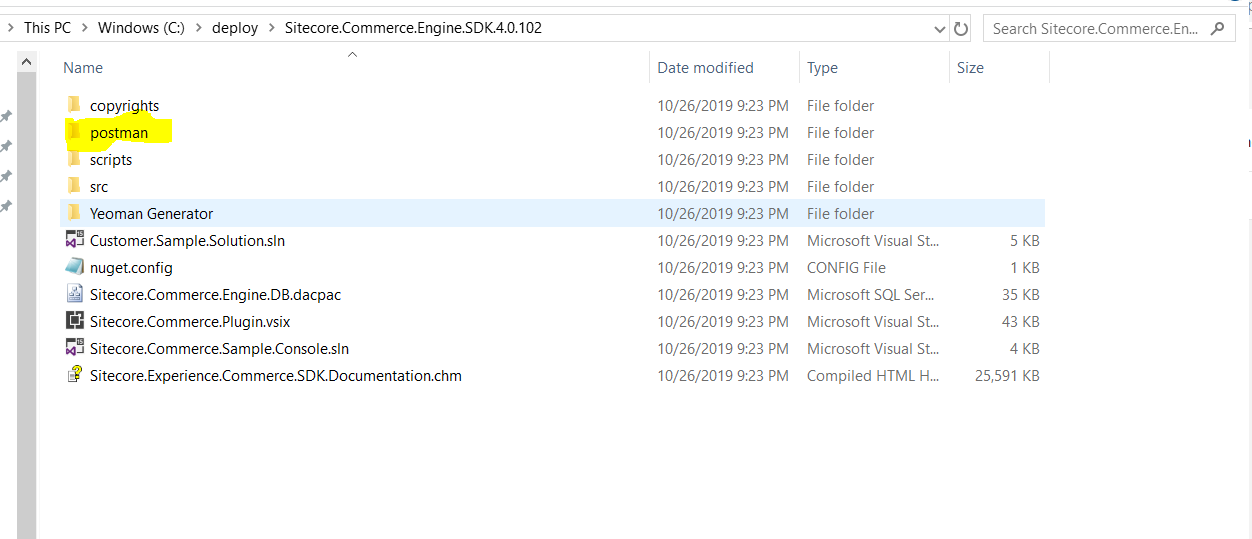
Sitecore commerce SDK has provided an API collection which we can easily import in the postman and see all request and response details, Here are the few steps to configure and a high-level view.

References -


  1.  https://doc.sitecore.com/developers/90/sitecore-experience-commerce/en/execute-sample-api-calls-in-postman.html
  2. https://doc.sitecore.com/developers/90/sitecore-experience-commerce/en/list-of-sitecore-xc-postman-collections.html


Step 1-  Check the Sitecore installation folder


Step 2 - Setup postman - You can download it from here

Turn off the SSL setting for the local environment.


this is just for the test/local environment.


There are two folders for the import.


Step 3 -  Import environment settings.


Step 4 -  AntiForgeryEnabled settings - by default it's true


This setting is just for the local environment to check the API call, We need to keep this on in the live environment.

Step 5 - API walkthrough and flow.

Please make sure to update the environment variable based on your local environment settings, Like username and password and local authoring URL etc.


Generate token -


Step 6 - Place an order through the API -


Conclusion - Sitecore has provided out of the box well-structured API setup, We can use this API to call directly to perform the operation, debugging purpose and can wrap these APIs and expose them to the front end for the development.