Wednesday, June 24, 2015

Sitecore integration with Exact Target (SalesForce)

Step by Step integration of Sitecore with ExactTarget (SalesForce).

1.    Login Process
First, we need to login to extranet portal and it will send an authentication code, basically for every device its sending one time authentication code.


1)    It will ask for the authentication through the email for one time code.


2)    Home Screen.


2.    Automation of welcome email series with exact target.

1)    Scenario #1: - Send three emails over a period of several days to welcome new accounts to your company
Standard practice:-

 As per the study:-

1) Step one Welcome (Day One ) - Welcome subscriber to program, Set Expectations about the types and frequencies of email communications. Educate on HOW subscribers were opted-in

2) Confirm ( Day Three ) - Email to onboard subscriber into the brand experience, Gain customer information related to their profile and even offer and incentive for full completion.

3) Reward (Day Five) - Engage cosumers futher into the brand experience via community,relevant offers and product/service insights

 
2)    Process to send the welcome email through exact target

 If we talk about the process then it will goes like below

1) Step One :-    Create the emails
2) Step Two :-    Build Reports in Salesforce
3) Step Three :-  Define the User-Initiated Emails in ExactTarget
4) Step Four :-    Automate via AUtomative Studio


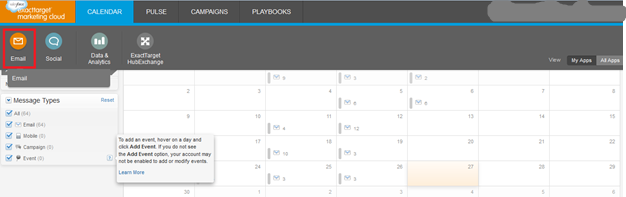
3)    Click on email section


4)    Go to content- email section


This is the place where we need to create the email through the Sitecore application

3.    Configuration section Step by Step.


1)    Create new project in visual studio – 2010/2012
2)    Add reference to service:-


For more details about the appropriate service, Please go through below link:-


3)    Required Namespace to include in the project
Using ExactTarget. ExactTargetAPI;
Using System. ServiceModel;

4.    Creating the connection apps and Integration.


1)    Setup to create the app

2)    Sign in


3)    Choose API integration


4)    Make a link to account


5)    A message to show which account you will be connecting through the API’S.


6)    Required to set appropriate rights to access the API’s


7)    Started


5          Creating new email through the SDK.


1)    Finally resolved the authentication related issue through the SDK, as mentioned in Point#4 how to create the App.
2)    After that we need to configured the key values, as below


3)    Creating the new email setup in exact target


4)    Email Name is as below


5)    Other details:-
SDK Name :- "CSharpSDKEmail"
Customer Key:- "CSharpSDKEmail"

6)    Here is the result


7)    Thanks a lot for the kind passions, finally We have created new email in the exact target


6          Technical issues and resolutions.


1)    Once we execute the programme, we received below errors.

Solutions 1:- Need to update the binding:-
From
<binding name="SoapBinding">
                    <security mode="Transport" />
                </binding>
    To
   <security mode="TransportWithMessageCredential">
                    <transport clientCredentialType="None" proxyCredentialType="None" realm="" >
                      <extendedProtectionPolicy policyEnforcement="Never"></extendedProtectionPolicy>
                    </transport>
                    <message clientCredentialType="UserName" algorithmSuite="Default" />
                  </security>
                                                                                                                                                            After executing the programmed it gives below errors
                                                                                
  Solutions 2:- Add the custom binding as mentioned below in web.config
Under binding section
<bindings>

      <customBinding>
        <binding name="SoapBinding" closeTimeout="00:30:00" openTimeout="00:30:00" receiveTimeout="00:30:00" sendTimeout="00:30:00">
          <security authenticationMode="UserNameOverTransport">
            <secureConversationBootstrap />
          </security>
          <textMessageEncoding messageVersion="Soap11WSAddressingAugust2004" />
          <httpsTransport maxReceivedMessageSize="655360000" />
        </binding>
      </customBinding>
Set the end point under client section
  <client>
     

      <endpoint address="https://webservice.exacttarget.com/Service.asmx" binding="customBinding"
                bindingConfiguration="SoapBinding" contract="ExactTargetAPI.Soap" name="Soap" />

Error
4)    Execution and diagnosis
Make sure the credential you are trying to connect has the right of API User:-

5)    Download new SDK link from


Sunday, May 10, 2015

What are the new trends in the technology aligned to market and global strategy?

We have seen lots of changes in the digital marketing, e-Commerce, mobility, Cloud and of course the key around the big data.

What is new for Microsoft techies...? Additionally Sitecore and Dynamic lovers??

I am actually key learner of Sitecore and Dynamic technology like Microsoft dynamic CRM, SharePoint, NAV, AX, GP and SL.

It gives pleasure when you find how these technology going interconnected internally and leading the market trend. Yes, that’s very true.

Here are some fact and research, how these will be leading in the upcoming market.

There are lot of technology comes in the market but they are individual performers, but Microsoft have its own Umbrella and very large ancient family... Now Microsoft is combining all the ancient families and underneath family members... Adding some very closed relative (Sitecore) and making the single bullet to fit all the market trends.

Let’s give an example about all the family member and how it will be interconnected and will fit the market trends.

Before going to example would like to give a short description about these families.

1) Microsoft Dynamic CRM :-
Market Focus: - Sales, Marketing, and Service
Market Leaders:- More features than just salesforce automation
2) Microsoft ERP:- Microsoft Dynamics AX,Microsoft Dynamics GP , Microsoft Dynamics NAV, Microsoft Dynamics SL.
Market Focus:-  finance, manufacturing, supply chains, analytics and electronic commerce, Reporting , Business analysis and automate projects, Industry-specific customization, compliance etc.
Market Leaders :-It’s different from traditional ERP it run finances, sales, and operations together with the familiar Office apps with good reporting tools to track ROI.
3)  Microsoft SharePoint: - Integrates intranet, content management, and document management.
4)  Microsoft Azure:- Building, deploying and managing applications and services through a global network of Microsoft-managed data canters.

 Now it’s time to talk about Sitecore:-

Sitecore: - It has the capabilities to easily connect with Microsoft dynamic CRM and SharePoint. It already brings e-commerce into Customer Experience.

The world of technology has changed within short time period and it’s still changing according to the market needs.necessitly and luxury...
If we talk about the e-Commerce there are huge change in the trend but still the retailer and business struggling to find out a single platform where they can manage all the stuffs through the single key.
Sitecore has all these capabilities like the customer engagements through CMS, DMS( campaigns, Marketing, advertisements), Better customer management and service through Microsoft dynamic CRM, Intranet document , HR and Admin policies management through Microsoft SharePoint , and have capabilities to manage the finance and all the stock, production life cycle and ROI calculation, e-Commerce module with Microsoft, cloud deployment etc.
Sitecore Commerce Server – A single platform for all these solutions.
This is a product for building multichannel e-commerce applications and systems using Microsoft .NET technology. Previously known as Microsoft Commerce Server, it is now developed, sold, and supported by Sitecore; although Microsoft will provide support of Microsoft Commerce Server 2009 through 2019.
The Sitecore Experience Platform completely integrates web content management, marketing automation, email marketing, social media, optimization, and analytics, it’s very easy to understand the process and designed very user friendly. Sitecore now has an amazing foundation to bring an integrated enterprise-grade e-commerce solution into the platform, providing a comprehensive end-to-end solution for customers that want to engage in e-commerce. Sitecore will also continue to develop and support a stand-alone Commerce Server offering.
Sitecore Commerce Server is a set of pre-packaged tools for building and deploying e-commerce websites and e-commerce software applications using Microsoft.NET technologies. It can be run on premises or, with the additional support for Microsoft Azure and Amazon Web service introduced in version 10.1.
·         Core Systems:
·         Catalog
·         Inventory
·         Order Capture
·         Discounts
·         Profiles
·         Integration Points:
·         Orders Web Service + BizTalk Adapter
·         Catalog and Inventory Web Service + BizTalk Adapter
·         Profiles Web Service + BizTalk Adapter
·         Marketing Web Service
·         Desktop Business Tools:
·         Catalog Manager
·         Marketing Manager
·         Customer and Order Manager
·         Commerce Server Staging
·         Merchandising Manager (replacement of Catalog Manager)
·         Sitecore Experience Platform Integration


Sitecore Acquires Leading E-commerce Vendor commerceserver.net from SMITH (http://www.smith.co).

Basically commerceserver.net was transmitted by Microsoft and Microsoft will provide the support till 2019.

The acquisition will be the new ERA in the market and will provide the good experience to the customer as it’s a solid combination of CMS, DMS and commerce module and this integration will track and watch all the life cycle of customer as well as product and deliverable.

Hence, we can say the next ERA will be very awesome and fruitful for the customer and service sector.

Saturday, March 28, 2015

Sitecore Certified Professional Developer - 7.2 and key learning.


Today, I have completed my Sitecore Certified Professional Developer - 7.2, It was not easy we attended three days full-day training and given the exam and it's required to clear the exam in one attempt.

I got in-depth learning of below modules -


  1. Sitecore API
  2. Architecture
  3. Creating and Editing Items
  4. Development Environment
  5. Fields and Field Types
  6. Installation
  7. Media
  8. Module Packages
  9. Presentation
  10. Publishing
  11. Search
  12. Sitecore Documentation and Support
  13. Templates
  14. Versioning
  15. Management

The certificatin cost including trainig was around 2500 USD

Wednesday, February 11, 2015

Sitecore :- How to create new language version for all items

Hi Friends,

Today we got  some requirement for the multilingual site, the requirement was to create a new language and set the version for all the items in the content tree through the code.

Here is the sample code to achieve this task.


 var homeItemA = Sitecore.Context.Database.GetItem(Landings.HomeItem);
            var languageA = Sitecore.Globalization.Language.Parse("en-SG");//new language version

            var master = Sitecore.Configuration.Factory.GetDatabase("master");

            var allItems = master.GetItem(homeItemA.Paths.FullPath).Axes.GetDescendants();


            foreach (var blog in allItems)
            {
                Item ca = master.GetItem(blog.Paths.FullPath, languageA);


                using (new Sitecore.SecurityModel.SecurityDisabler())
                {
                    try
                    {
                        if (0 == ca.Versions.Count)
                        {
                            ca.Versions.AddVersion();
                        }

                     
                    }
                    catch (Exception ex)
                    {
                        ca.Editing.CancelEdit();

                    }
                }
            }

Saturday, February 7, 2015

Sitecore - Best Sitecore Team Award and key highlights.


We have been working on one of the main projects and delivered all items on time, I was leading the team and it got the best team of the year for Sitecore delivery.


  1. Don’t step in with solutions too quickly. 
  2. Everyone can help you learn something.
  3. Keep communicate and ask for are you okay or need any help
  4. Keep trying
  5. Always try new things, It will keep you motivated/excited.
  6. Be authentic and honest for work progress.